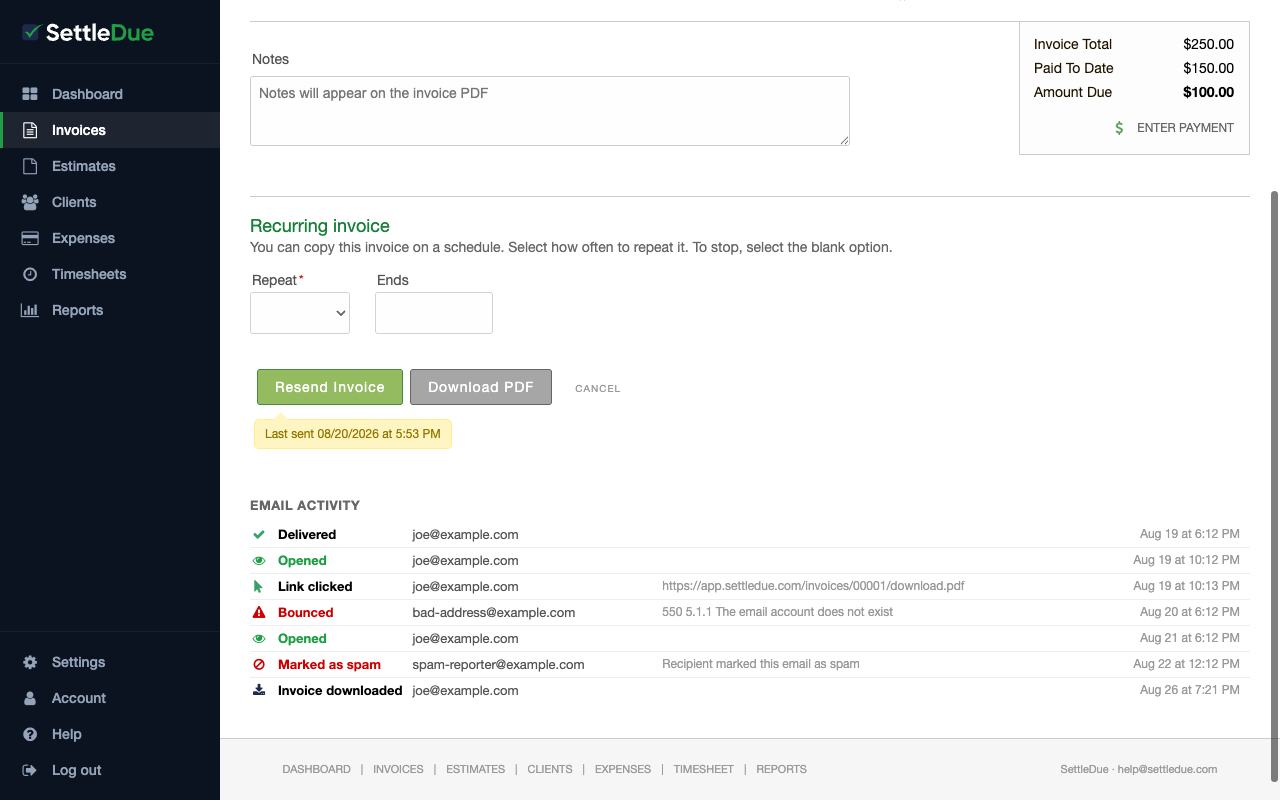
After you send an invoice, SettleDue tracks what happens to the email. You can see delivery, opens, clicks, bounces, and more on the invoice edit page.
View email activity
Go to Invoices and open a sent invoice.
Scroll down past the invoice form. The Email Activity section shows a timeline of events.
Event types
The timeline can show these events:
Delivered — the email reached the recipient's mail server.
Opened — the recipient opened the email. This can appear more than once if they open it again.
Link clicked — the recipient clicked a link in the email, such as the PDF download link. The URL they clicked is shown.
Bounced — the email could not be delivered. The bounce reason appears, for example "The email account does not exist."
Marked as spam — the recipient marked the email as spam.
Invoice downloaded — the client downloaded the PDF from the invoice portal.
Each event shows the recipient email address and the date and time.
The Email Activity timeline. Each row shows the event type, the email address, any details, and the timestamp.
If you see a "Bounced" event, check the client's email address on their contact record. The address may have a typo.
When tracking starts
Tracking starts as soon as you send or resend the invoice. Events appear automatically. There is nothing to turn on.