Online payments let your clients pay an invoice from the client portal. Clients can pay by card, or by bank transfer (ACH). SettleDue uses Stripe to process the payment. When the client pays, SettleDue records the payment on the invoice.
Online payments are a Pro feature. Stripe processes the payment. You keep a Stripe account, and you are the merchant of record for each payment.
Turn on online payments
In the app, click Payments in the sidebar.
Find Stripe. Click Connect with Stripe.
Sign in to Stripe, or create a Stripe account. Do the steps that Stripe shows.
When Stripe approves your account, the status shows Active.
Turn on bank transfer
Bank transfer (ACH) lets clients pay you from their bank account. It costs less than a card, and it is the online method that gets the cash discount. Turn it on before you set up dual pricing.
On the Payments page, find your Stripe row.
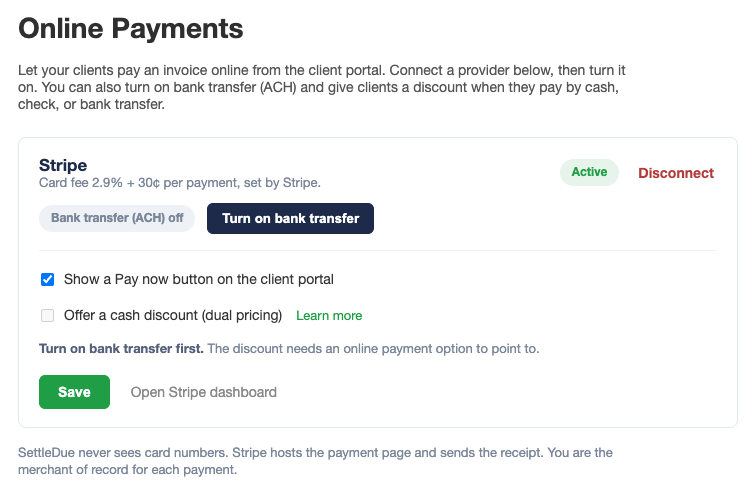
Click Turn on bank transfer.
Stripe turns on ACH for your account. This can take a moment, and Stripe may ask you for more details first.
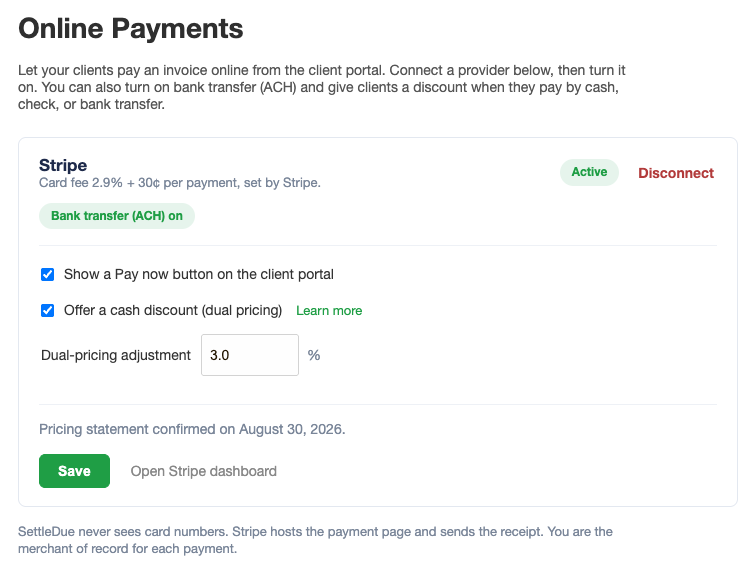
When it is on, the row shows Bank transfer (ACH) on.
Click Turn on bank transfer. The note reminds you to turn it on before you set a discount.
Offer a cash discount
After bank transfer is on, you can turn on dual pricing:
Turn on Offer a cash discount (dual pricing).
Set the Dual-pricing adjustment. The most you can add is 3%.
Turn on Show a Pay now button on the client portal if it is off.
Click Save. The first time, you confirm a short pricing statement.
Turn on the cash discount and set the adjustment.
How dual pricing works
With dual pricing, your invoice shows a card price as the posted price. Clients who pay by cash, check, or bank transfer get a lower price. This is a cash discount, not a card surcharge. A card payment uses the card price.
Show the card price as your price. The client sees both prices before they choose. Your revenue and your reports stay the same, because the amount you keep is the lower price.
Show the card price as your listed price on your quotes, ads, and website. Do not advertise the lower price as your standard price. Some states control how you show prices. You are responsible for lawful use where you operate.
How your client pays
Your client opens the invoice link and sees the client portal.
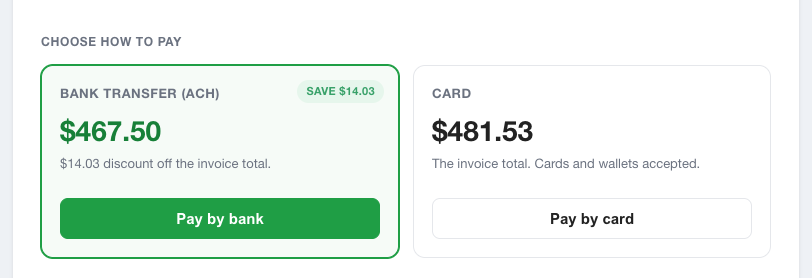
The client picks a payment method. Bank transfer, cash, and check get the lower price.
Stripe shows a secure payment page. The client pays online by card or bank transfer.
Your client picks how to pay. Bank transfer gets the lower price.
SettleDue never sees the card or bank details. Stripe hosts the payment page.
After a payment
SettleDue records the payment on the invoice. The balance goes down, or the invoice shows Paid in full.
A card payment is instant. A bank transfer takes a few business days to clear.
Stripe sends the client a receipt. SettleDue sends the client a paid copy of the invoice.
Fees
Stripe charges a fee for each payment. A card is about 2.9% plus 30¢. A bank transfer costs less. Stripe takes the fee from the payment.
Manage or disconnect
You can change your settings at any time on the Payments page. Click Open Stripe dashboard to see your payouts, refunds, and disputes in Stripe. To stop online payments, click Disconnect.
Related guides
Client portal. How your client views and pays the invoice online.
Record payments. Add a payment by hand, for cash or a check.